
FREE EXCEL RESOURCES
Free Excel Dashboard Builder Lite and practical resources to help you work faster
Explore step-by-step Excel tutorials, practical workflow ideas, and the free OneXcel Builder Lite—plus see what the full Dashboard Builder can do.
Free learning resources • Practical examples • OneXcel Builder Lite

START HERE
Choose what you need today
Learn a skill, try the free Builder, or explore the complete OneXcel product collection.
LEARN
Excel Tutorials
Step-by-step lessons for formulas, shortcuts, cleanup, dashboards, and practical spreadsheet workflows.
TRY IT FREE
Builder Lite
Get the real OneXcel Builder experience in a free macro-enabled workbook with up to 4 reports.
EXPLORE
Excel Templates
Browse the current OneXcel Excel tools for reporting, accounting, productivity, planning, and more.
LATEST EXCEL TUTORIALS
Learn one useful Excel skill at a time
New lessons appear here automatically as they are published.
-

CAGR Formula in Excel: RRI, Months and Negative Values
Read tutorial →: CAGR Formula in Excel: RRI, Months and Negative ValuesCAGR formula in Excel: (end/start)^(1/years)-1, RRI and POWER, the years mistake, CAGR vs average growth, months and dates, negative values. Free calculator.
-

Running Total in Excel: Cumulative Sum, by Group and in a Table
Read tutorial →: Running Total in Excel: Cumulative Sum, by Group and in a TableRunning total in Excel: running balance, expanding SUM, blank rows, a table running total, totals by category or month, and YTD vs…
-

How to Calculate Age in Excel (DATEDIF: Years, Months, Days)
Read tutorial →: How to Calculate Age in Excel (DATEDIF: Years, Months, Days)Calculate age in Excel from a date of birth with DATEDIF: years, months and days, as of today or any date, YEARFRAC,…
FULL BUILDER PREVIEW
See what the OneXcel Dashboard Builder can do
These are real Builder views. Builder Lite gives you the core workflow with selected advanced features reserved for the Full Version.
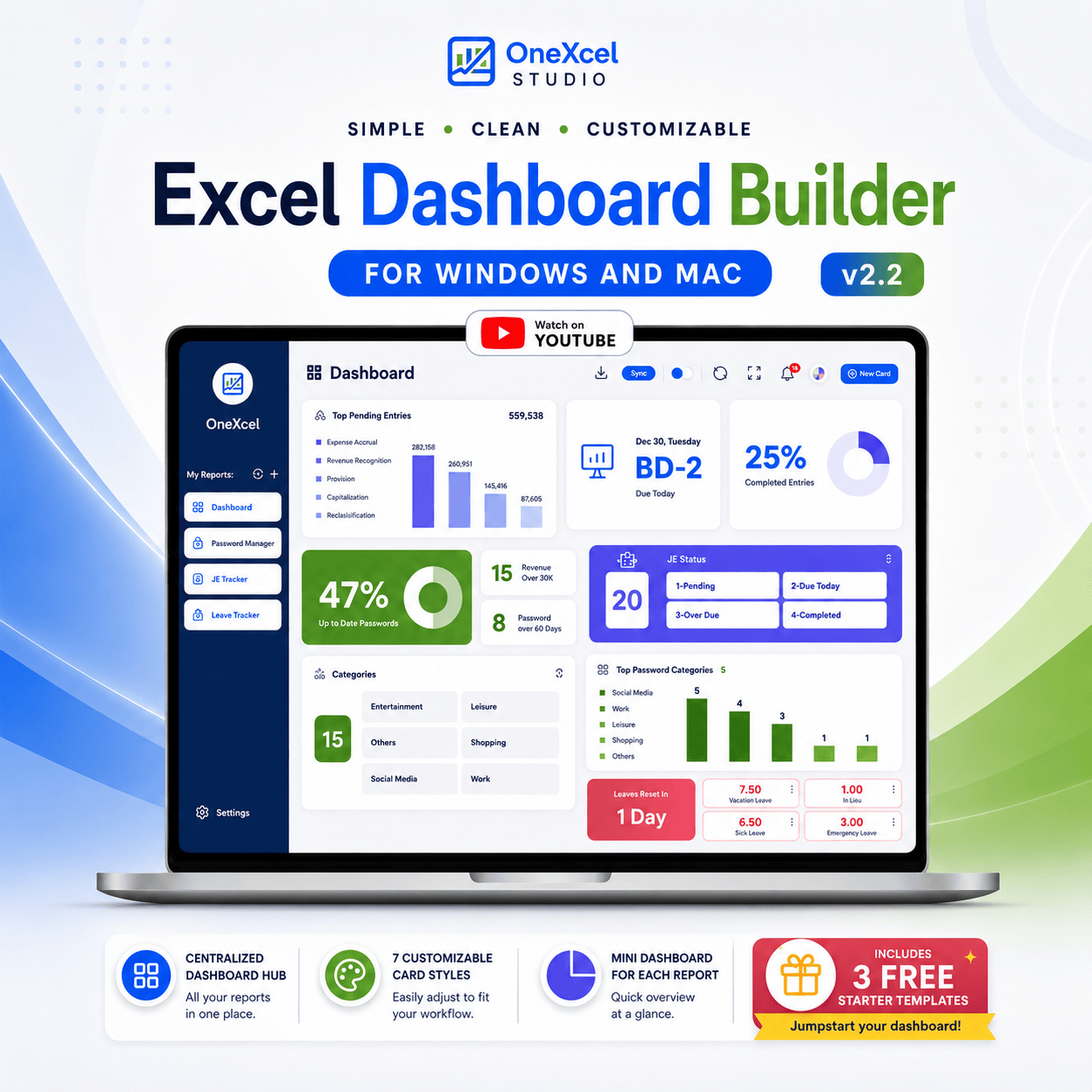
ONE CONTROL HUB
Bring reports and dashboard cards together
Use the Main Dashboard as a central hub, switch between reports from the sidebar, move dashboard cards around the canvas, and use the built-in workspace controls from one view.
- Central report navigation
- Dashboard cards and mini dashboards
- Refresh, focus, notification and workspace tools
Build Visual Reports
Create report sheets with a structured report table, mini cards, search, focus mode, and built-in report tools.
Add Useful Columns Faster
Add dropdown lists, status circles and fills, comments, email icons, and automatic numbering to make report tables easier to use.
FULL BUILDER
7 Card Types
Count, Sum, Progress, Top, Info, Slicer and Button Cards.
FULL BUILDER
Flexible Customization
Resize cards, choose styles, select icons and apply unified report colors.
FULL BUILDER
Standalone Templates
Save a finished dashboard as a streamlined template for distribution.
FULL BUILDER
Custom VBA Functions
Use Button Cards with preset VBA functions or your own VBA code.
FREE BUILDER LITE
Try the real Builder workflow for free
Builder Lite is a macro-enabled Excel workbook that lets you experience the OneXcel Builder with a limited feature set before moving to the Full Version.
- Real Builder Lite workbook
- Create up to 4 reports
- Macro-enabled Excel file (.xlsm)
Desktop Excel is required for VBA features. Enable macros after opening the workbook.
GET INSTANT ACCESS
Send Builder Lite to your inbox
Enter your email and the current MailerLite automation will send the Builder Lite download.
You’ll also receive occasional Excel tutorials and OneXcel product updates. Unsubscribe anytime.
BUILDER FAQ
Questions before you download?
Here are the important differences between Builder Lite and the Full Builder, plus the requirements for using the workbook.
Is Builder Lite really free?
Yes. Enter your email in the form above and the current MailerLite automation will send the Builder Lite download to your inbox.
What does Builder Lite include?
It gives you the real Builder Lite workbook, the core Builder workflow, the ability to create up to 4 reports, and a macro-enabled Excel file (.xlsm).
Is Builder Lite the same as the Full Builder?
No. Lite is intentionally limited. The Full Builder unlocks advanced capabilities such as more than 4 reports, additional customization, notification options, extra card and chart features, and the Button Card.
Does it work on Windows and Mac?
The Builder product materials state Windows and Mac support. Use desktop Excel for the Builder’s VBA features.
Why do I need to enable macros?
The Builder uses VBA for its interactive features. Enable macros after opening the workbook so those functions can run.
Can I use the Builder in Excel for the web or on mobile?
Use desktop Excel for the VBA-powered Builder workflow. Web and mobile Excel are not the intended environment for the macro features.
Do I need to know VBA?
You do not need to write VBA for the normal Builder workflow. Custom VBA is an optional Full Builder capability available through the Button Card for advanced use.
Where can I get help?
The Builder includes Help & Support access. You can also contact onexcelstudio@icloud.com if you have questions.
BROWSE BY SKILL
Find the Excel topic you need
Jump into the current tutorial categories and return as the library grows.
Keep learning—or start building
Use the free tutorial library when you need a quick Excel answer, or explore OneXcel tools when you want a ready-made starting point.